OCTA GST
  • Pricing
Contact SalesLogin
User Guide
  • Getting Started

    • Overview
    • Managing Companies
    • Managing Team
    • GSTIN Search
  • Reports

    • Overview
    • GSTR-1
    • GSTR-2A
    • GSTR-2B
    • GSTR-3B
    • GSTR-9
    • GSTR-9C
    • Annual Reports
  • Importing Sales Register

    • Overview
    • Octa Format
    • GSTR-1 Format
    • Amazon Format
    • Flipkart Format
    • Meesho Format
  • Filing GSTR-1

    • Import Sales Register
    • Prepare GSTR-1
    • Upload & Filing
  • Invoice Management System (IMS)

    • Overview
    • Reconciliation
    • Import Actions
    • Push Actions
  • GSTR-2B Reconciliation

    • Import Purchase Register
    • Import GSTR-2B
    • Invoice Matching
    • Supplier Reconciliation
    • Invoice Reconciliation
    • Reconciliation Report
  • ITC Claim

    • Overview
    • Auto Claim
    • Manual Claim
    • Onboarding
    • Upgrading
    • References
  • Filing GSTR-3B

    • Overview
  • Filing GSTR-9

    • Filing GSTR-9C

      • Filing GSTR-6

        • Overview
        • Add ISD GSTIN
        • Add Recipients
        • Import Purchase Register
        • Download GSTR-6A
        • GSTR-6A Reconciliation
        • ITC Claim for Distribution
        • Distribution of ITC
        • Filing of GSTR-6
      • FAQs

        • Cleartax Migration
        • Enable API Access

      FAQs

      Enable API Access

      #How to enable API access on Govt GST Portal?

      • Login to Govt GST Portal: https://gst.gov.in
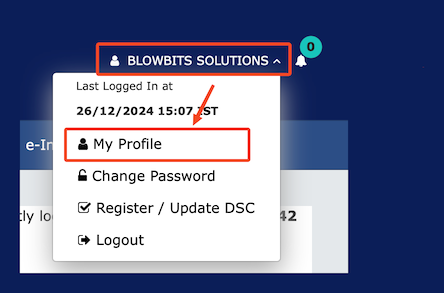
      • Open My Profile

      Open Profile

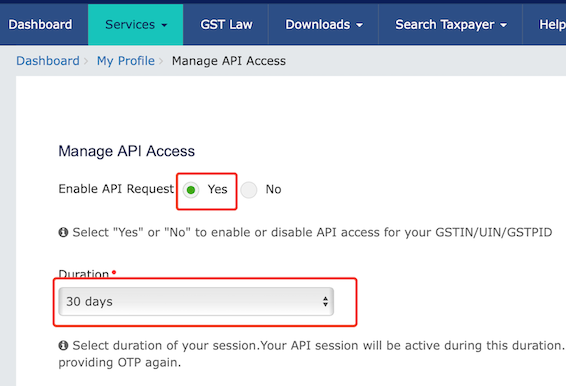
      • Click on Manage API Access
      • Select Enable API Request: Yes
      • Select Duration: 30 Days

      Enable API Access

      • Click Confirm and save the changes.